RezeptSuite · Cloud & Desktop

Recipe management –⁠ in the Cloud or as a desktop program

Collect and import recipes, plan meals, shop together and cook step by step. RezeptSuite helps you do it in the Cloud or with a desktop program –⁠ whichever suits your daily routine.

Create a free Cloud accountTry Desktop for free

Cloud: Includes 7 days of Plus. Your account then automatically remains on free Basic; Plus costs €15 per year.

Open the Cloud demo without signing up

Cloud –⁠ browser and Android app

Desktop –⁠ Windows, macOS and Linux

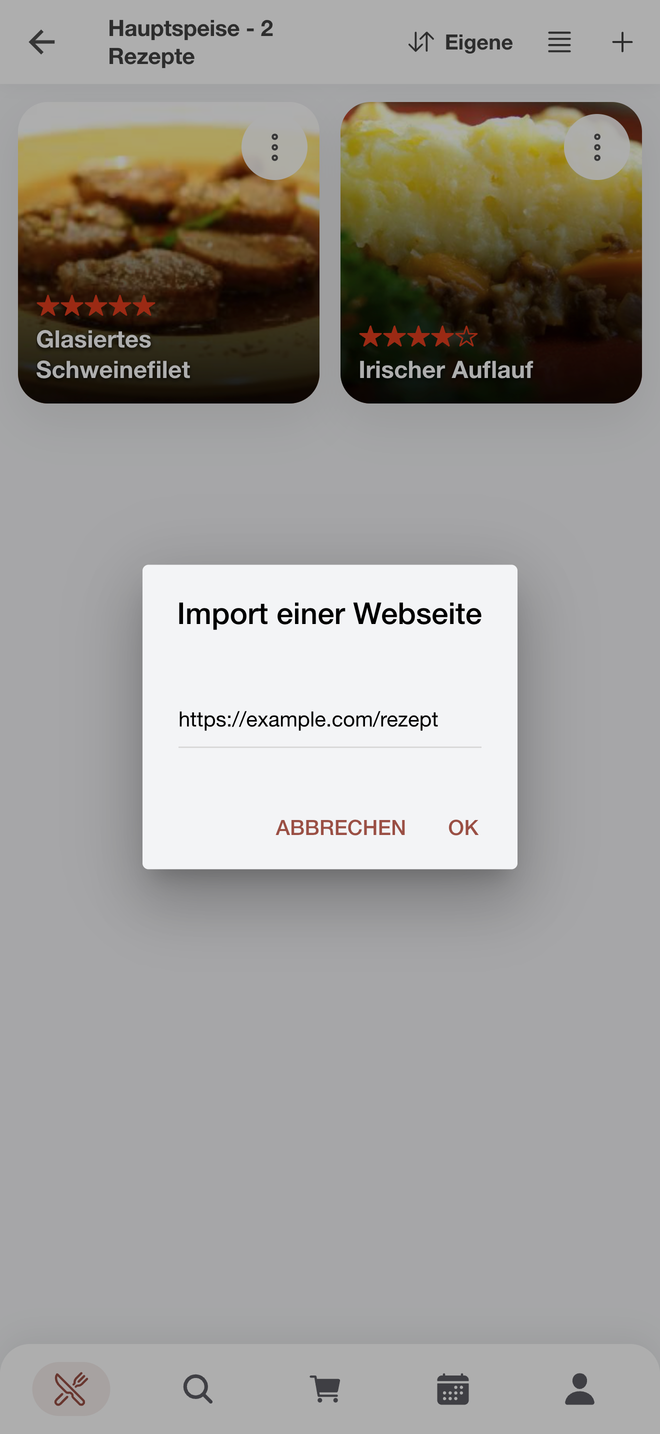
Android app import dialog with a field for the web address of a recipe page

RezeptSuite CloudImport the recipe

Cloud or Desktop –⁠ how would you like to use your recipes?

Both versions manage recipes and create shopping lists from them. You use Cloud directly in your browser and in the Android app; your collection is stored in your Cloud account. Desktop is the installed program for your computer and works either with a local database or with your Cloud account.

RezeptSuite CloudBasic free · Plus €15/year

Your recipes –⁠ always at hand

Use your recipes in your browser and the Android app. Plan your week, manage shopping lists together and easily share recipes by link.

Basic · free
100 recipes, 200 images, weekly plan, shopping list and sharing by link.
Plus · €15 per year
Website import, AI-powered photo import, AI calorie calculation and a sorted shopping list. Space for 2,000 recipes and 4,000 images.
RezeptSuite DesktopOne-time payment €19 · Business €49

Your recipes –⁠ on your own computer

A program for Windows, macOS and Linux. With a local database, you can work without internet access or an account. Alternatively, connect Desktop to your Cloud account and use the same collection in your browser and the Android app.

Trial version: 2 categories with 20 recipes each, no time limit, on any number of computers.

Full version: One-time payment of €19 (Personal) or €49 for commercial use (Business) with a shared database over a network, in each case per installation.

How it works in the Cloud

From import to the finished dish

Import a recipe from a website, create the shopping list from it and let cooking mode guide you through the preparation step by step.

1

Import a recipe from a website

With Cloud Plus, enter the address of a recipe page. RezeptSuite imports the title, ingredients with quantities and preparation instructions; review the result, make any necessary corrections and save it.

Android app import dialog with a field for the web address of a recipe page
2

Shop and tick items off

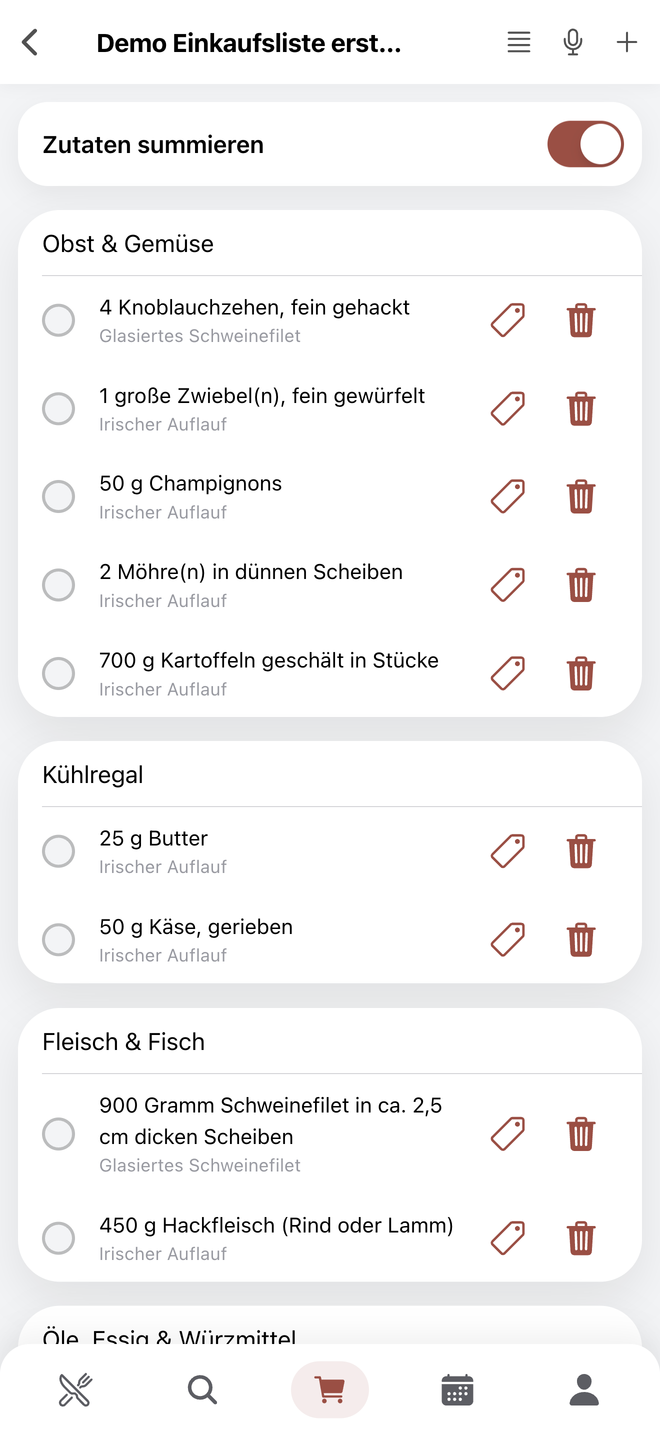
RezeptSuite adds ingredients from one or more recipes to the shopping list; identical ingredients are combined automatically. Tick off the ingredients on your phone while shopping. With Plus, the shopping list is sorted by shopping category – so you do not have to walk back to the refrigerated section three times.

Shopping list in the Android app, with ingredients grouped by shopping category and ready to tick off
3

Cook step by step

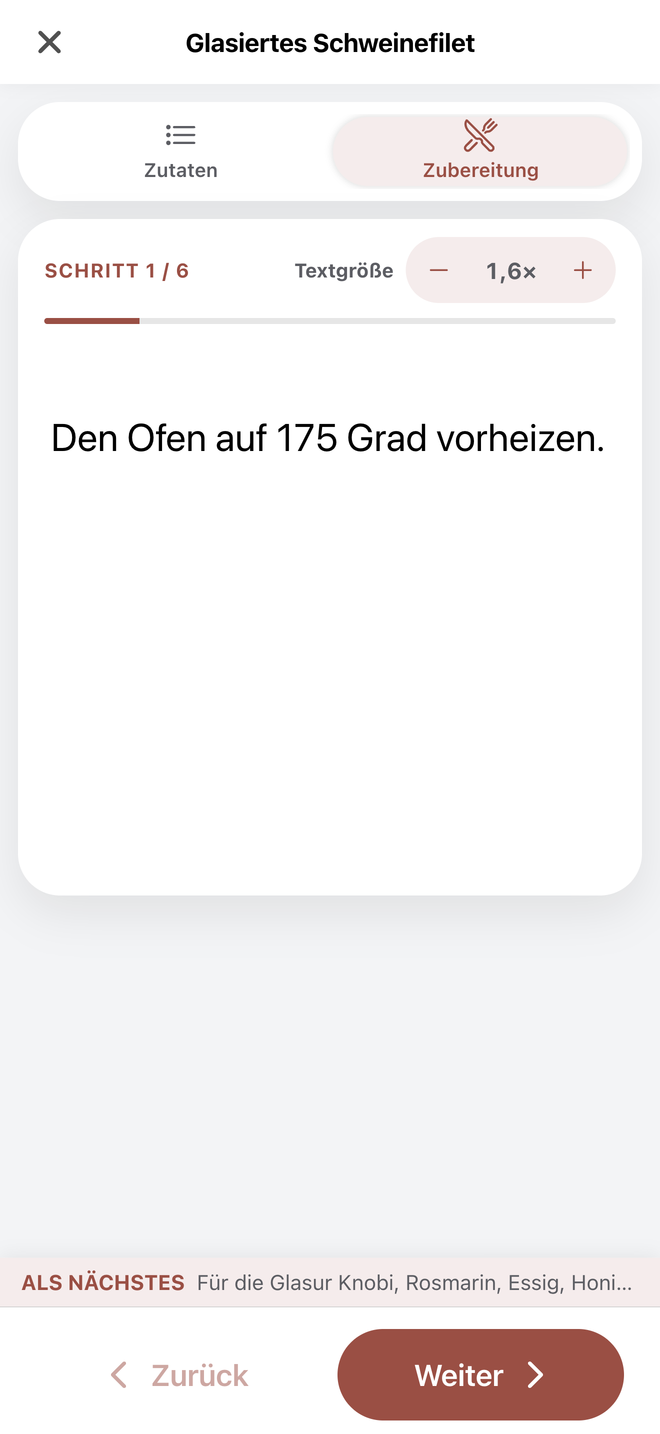
Cooking mode displays one preparation step at a time. Adjust the number of servings beforehand and tick off the ingredients as you gather them.

Android app cooking mode showing a single preparation step
Register for free and try Plus for 7 days

Good to know

Frequently asked questions about RezeptSuite

General

What is the difference between Desktop and Cloud?

Desktop is a program for Windows, macOS and Linux. It can work with a local database without internet access or an account, or alternatively use a Cloud account as its data source. Cloud is the online version for browsers and the Android app; the collection is available on your signed-in devices.

How much does RezeptSuite cost?

Cloud Basic is permanently free and includes 100 recipes, 200 images, a weekly plan and a shopping list. Cloud Plus costs €15 per year and adds website import, AI recipe import from a photo, AI calorie calculation, the categorised shopping list and space for 2,000 recipes and 4,000 images; the first 7 days after registration are free. Desktop is a one-time payment of €19 (Personal) or €49 (Business), per installation; Business installations can access a shared database over a network. VAT is neither charged nor shown because the provider is a small business owner under Section 19 of the German VAT Act.

Can I share recipes with others?

In Cloud, you send a private link to the recipe. In Desktop, you send individual recipes by email.

Where is my data stored?

When used locally, Desktop stores all data exclusively on your computer. With Cloud, your collection is stored in your account and is transferred in encrypted form. You can export your data at any time and delete the account yourself. Information about the hosting provider is available in the privacy policy.

About Cloud

Can I try Plus first?

Yes, automatically: All Plus features are available for 7 days after registration. The account then continues as free Basic, or you can purchase Plus for €15 per year.

How does importing from a website work?

Enter the address of the recipe page. RezeptSuite reads the title, ingredients, quantities and preparation instructions and creates a recipe that you can edit before saving. If the page does not contain a recipe, you can create one manually. Website import is a Plus feature and is available during the first 7 days after registration. It is available in Desktop when the program uses a Cloud account with Plus as its data source; Desktop can import local recipe files without an account.

What does AI recipe import do?

Upload a photo of a recipe, such as a page from a cookbook. Text recognition reads the text, AI organises it into ingredients and preparation steps, and you review the result before saving. This feature always starts with a photo –⁠ there is no field for pasting free-form text.

Can I use RezeptSuite on an iPhone or iPad?

Yes, directly in your web browser. A dedicated app is currently available only for Android; on iPhone and iPad, use RezeptSuite Cloud in your browser with the same recipes and shopping list.

How do I cancel Plus?

Plus runs for 12 months and renews automatically unless you cancel at least 4 weeks before it expires. At the end, the account returns to free Basic and your recipes are retained.

About Desktop

How do I get the Desktop full version?

There is no licence key. After purchasing, you receive a personal download link by email –⁠ immediately with PayPal or after payment is received by bank transfer. The link is available for a limited time, so download the full version promptly and keep the file in a safe place. The licence is valid permanently for version 6. Updates within version 6 are included; future major versions may require a separate purchase.

Does RezeptSuite work without an internet connection?

Desktop with a local database: yes, fully. Cloud requires a connection because the collection is stored in the account. To access a local Desktop database from an Android phone, use the free RezeptSuite Connect companion app –⁠ it connects to the computer on the same Wi-Fi network.

The best way is to simply try it

A Cloud account is quick to create and includes 7 days of Plus to try it out. The Desktop trial version has no time limit –⁠ purchase only when you are sure.

Register for freeTry Desktop for free